BOM · Purchasing · Inventory · Work orders

Off the spreadsheet.
Onto the shop floor.

VisualShop is built for small mechanical and electrical systems manufacturers — the shops running a parts library in one spreadsheet and a BOM workbook per job. It keeps the parts library and the job BOM you already know, then answers the questions a workbook never could: what do we buy, what is on the shelf, what has the build taken, and what did the job actually cost.

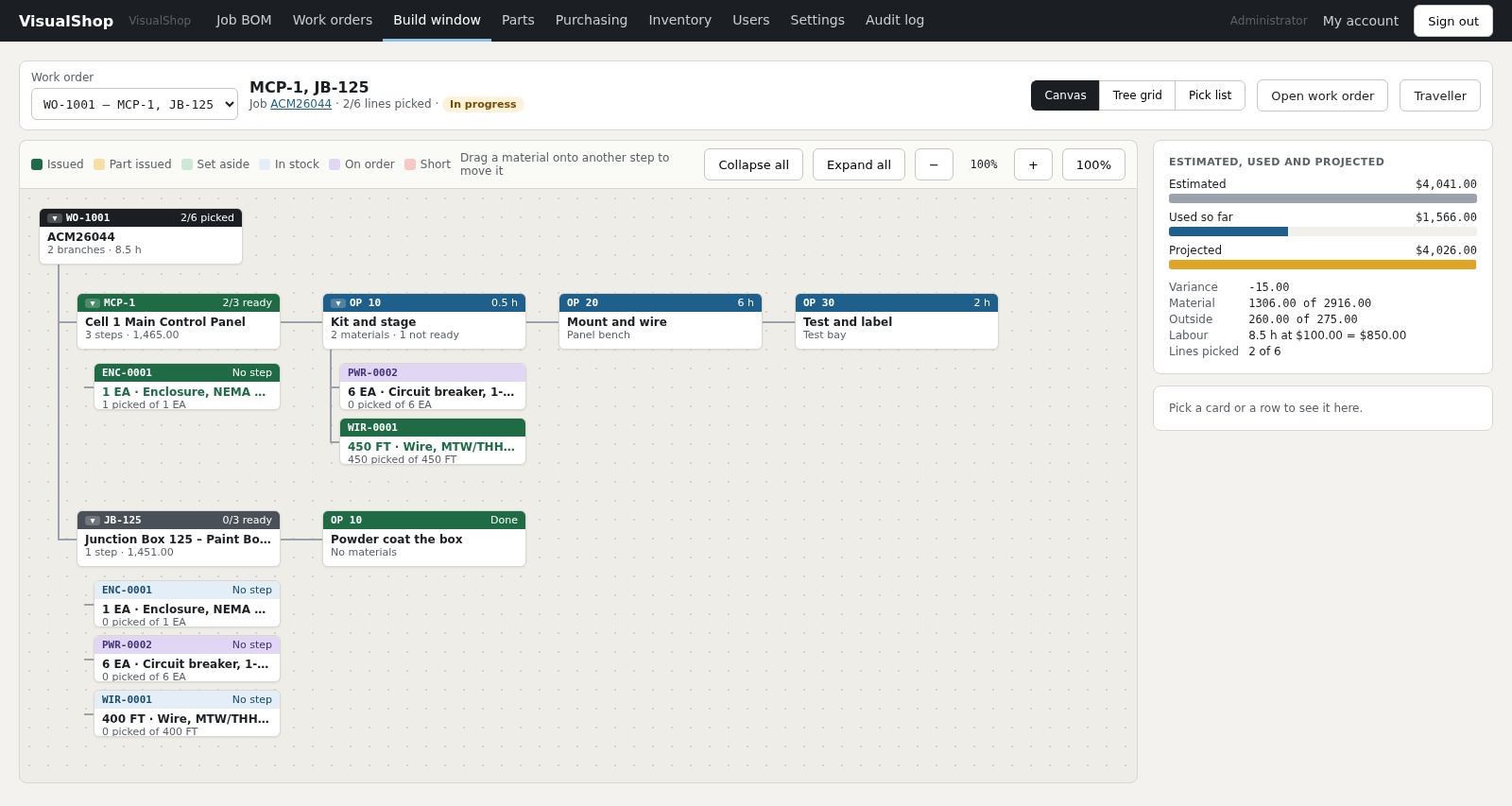
The VisualShop build window: a work order drawn as a canvas of cards. WO-1001 at the top, two branches below it for MCP-1 and JB-125, each with numbered operations, and material cards colour-coded issued, on order and picked. A cost panel on the right shows estimated 4,041.00, used so far 1,566.00 and projected 4,026.00.
Fig. 01 — Build window WO-1001, two branches, two of six lines picked. The canvas, the tree grid and the pick list share one selection.

Why it exists

The workbook is right until two people open it.

A parts library in one spreadsheet and a BOM file per job will carry a shop a surprisingly long way. It falls over in the same four places every time: nobody can say what is free to use, the buyer re-keys the same part onto a PO, the floor takes stock nobody wrote down, and the job cost is a guess made after the fact.

VisualShop was built around those four holes, and nothing else. It is not an ERP. There are no quotes, no sales orders and no vendor invoices — those stay in the accounting package that already handles them.

Follow a part through the system
One library One PartID per part, with every vendor, every manufacturer number and the last six prices paid. No more “is this the same breaker?”
One number for free stock On hand, less what is allocated to a released work order, less what is tagged to another job. Worked out once and used everywhere.
Cost, not an estimate Material at what it cost coming off the shelf, outside services at what the vendor charged, labour at the shop rate. Projected while the job is still open.
How work moves through it

Library to job cost, in one line.

Every screen in VisualShop sits somewhere on this line. A part is entered once, at the left, and everything downstream refers back to it.

How work moves through VisualShop Six stages in a row. Parts library, then job BOM, then suggested buys, then purchase order and receiving, then work order, then job cost. Underneath the last three stages runs the stock moves ledger, which records every movement of stock. 01 Parts library One PartID per part Vendors, maker numbers, units, last six prices. 02 Job BOM Line by location MCP-1, JB-125, FIELD. Spare %, then whole packs. 03 Suggested buys What to order today BOM, less free stock, less what is on order. 04 PO & receiving One PO, several jobs Each receipt opens a cost layer at what was paid. 05 Work order Release, pick, issue Stock moves to the work order and is spent there. 06 Job cost What it really cost Material, outside services and estimated labour. stock_moves — the ledger Every receipt, pick, return, scrap and count is a row. On hand is added up from them, never stored.

Fig. 02 — The whole application on one line. Stages 04 to 06 write to the stock ledger; stages 01 to 03 only read from it.

The screens

Dense, keyboard-first, and made for people who know their part numbers.

No dashboards nobody reads and no wizards. Every list exports to CSV and Excel, every list has a search box that takes a PartID, a part number or plain words, and every screen prints.

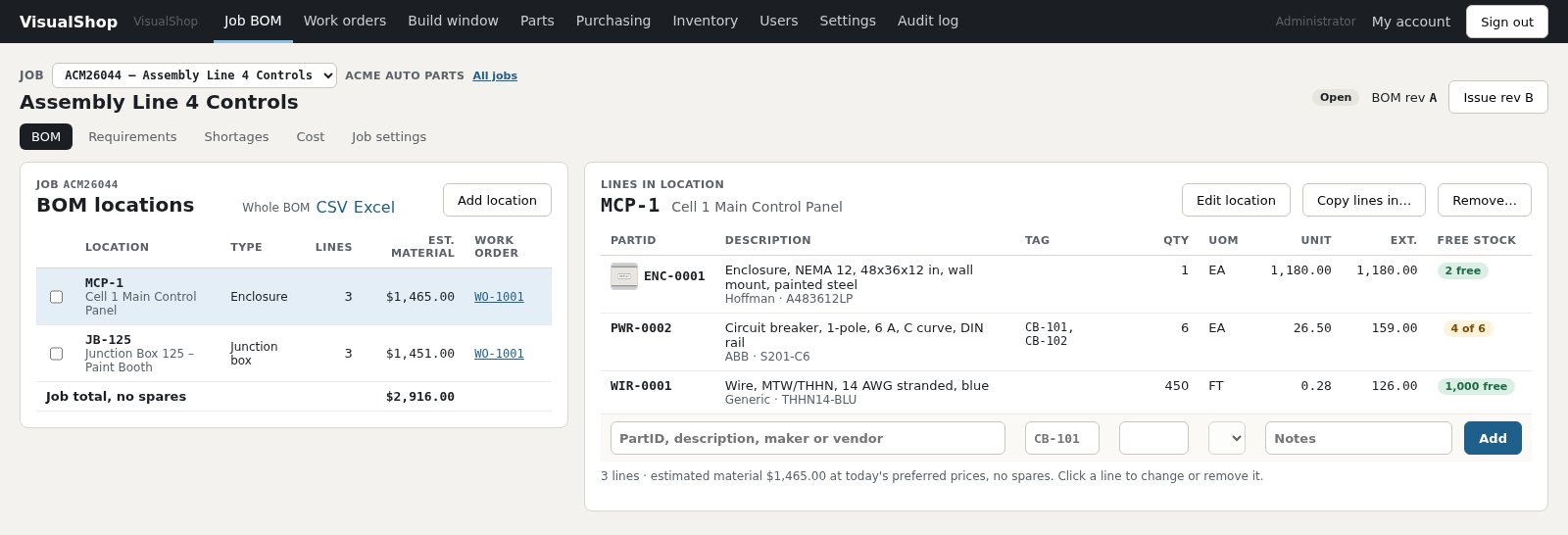
The Job BOM screen for job ACM26044. On the left, BOM locations MCP-1 and JB-125 with their line counts and estimated material. On the right, the lines in MCP-1: an enclosure, six circuit breakers and 450 feet of wire, each showing free stock as a coloured chip.
Fig. 03 — Job BOM Lines grouped by the location they are installed in.

Jobs and BOMs

A BOM that knows where the part goes

Lines belong to a location — a panel, a junction box, or FIELD — because that is how the shop builds and how the buyer thinks. Copy a location from a previous job and the lines merge instead of doubling up. Each line carries its own spare percentage, or takes the job's, or the category's.

The chip at the end of every line is free stock: on hand, less what a released work order has set aside, less what is tagged to somebody else's job.

The library

One part, one PartID, every vendor

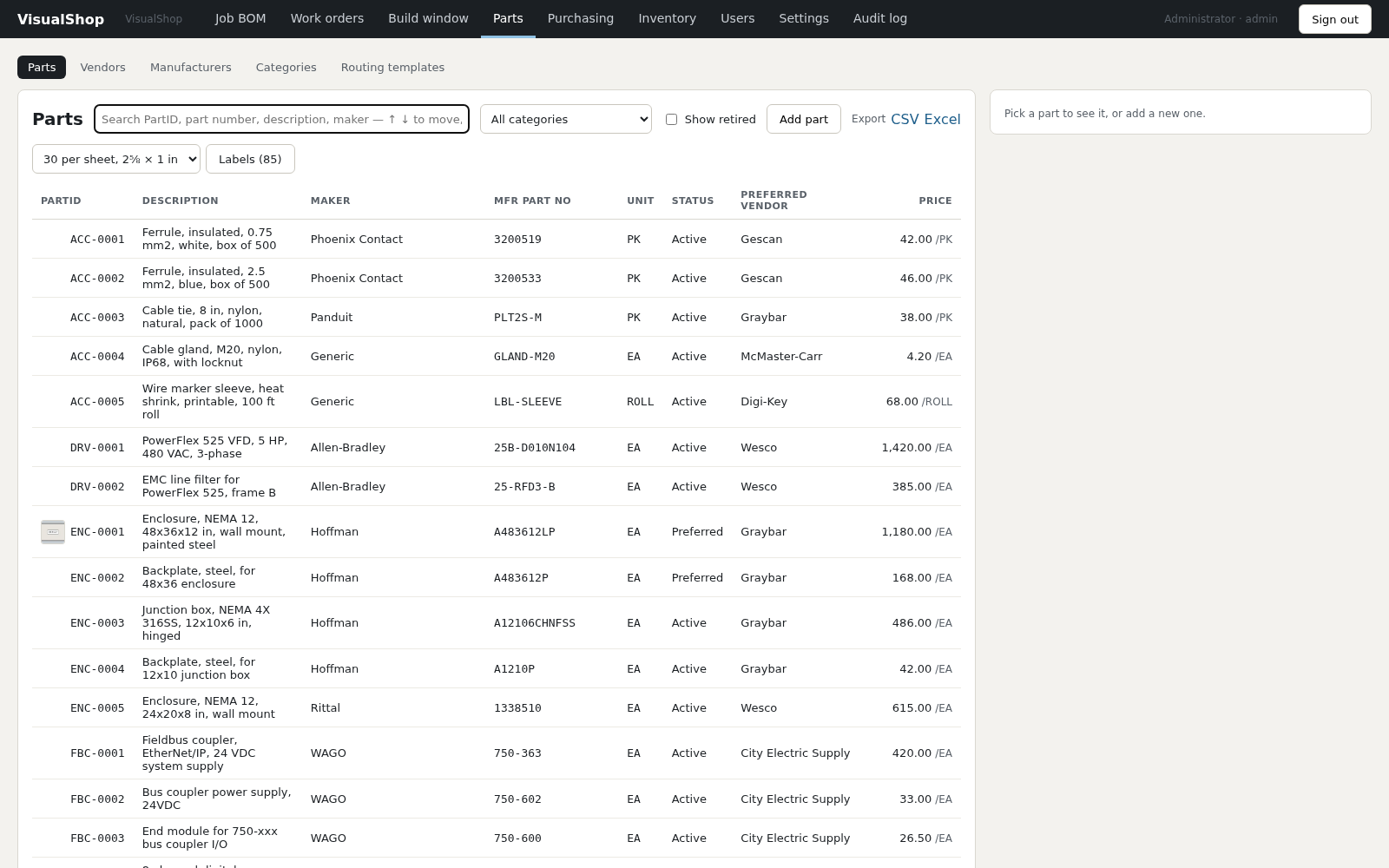
Parts are numbered by category — ENC-0001, PWR-0002, WIR-0001 — with the manufacturer's number, the vendors who sell it, what each one calls it, and what it last cost. Price history keeps the last six prices, so a jump is visible before it lands on a PO.

Your existing PartsLibrary.ods imports directly. There is a dry run first, and the report lands beside the file.

The Parts screen: a searchable table of parts with PartID, description, maker, manufacturer part number, unit, status, preferred vendor and price. A control above prints a sheet of 85 labels, thirty to a sheet.
Fig. 04 — Parts Eighty-five parts, and the control that prints them as a sheet of labels.
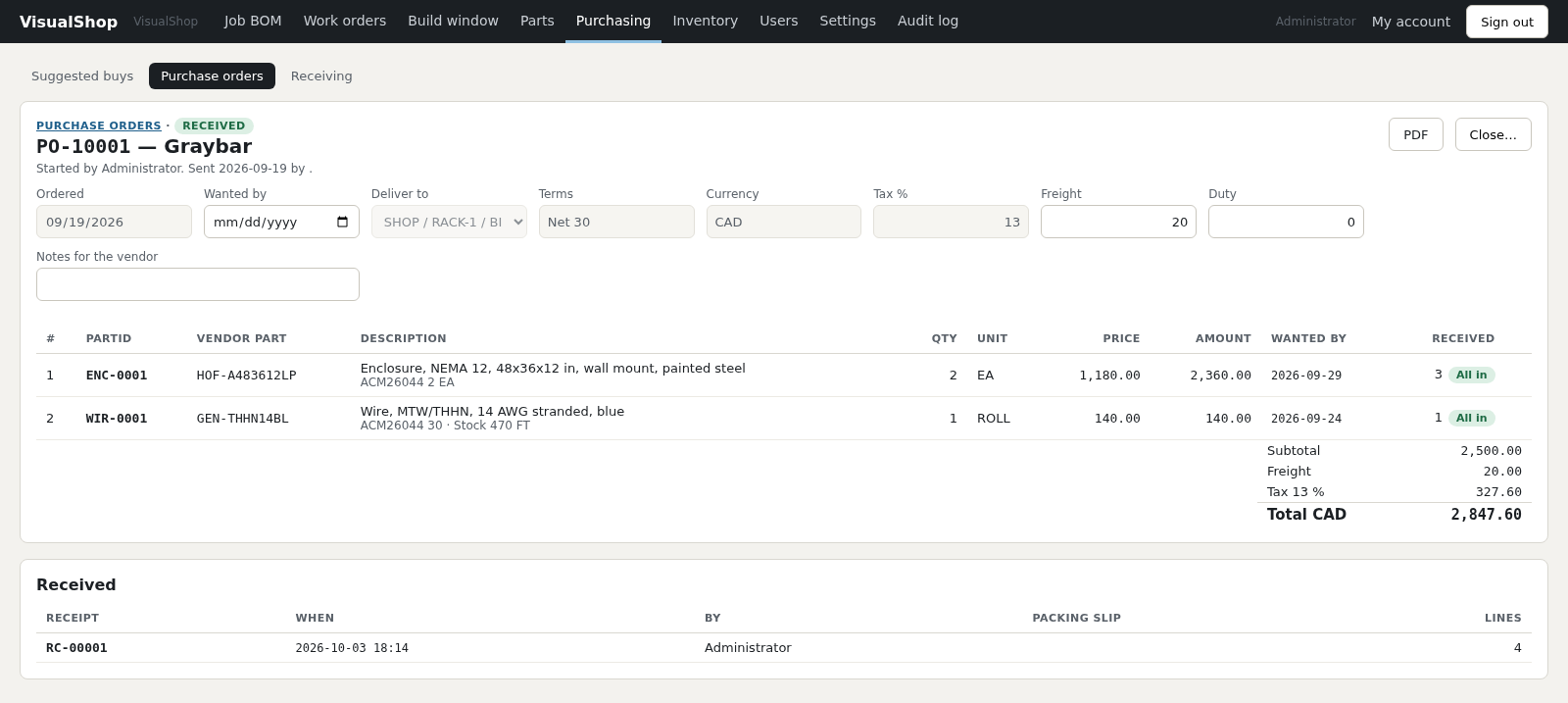
Purchase order PO-10001 to Graybar, marked received. Two lines, each showing the job the quantity is for, the price paid and a received chip reading all in. Freight and tax are listed separately above a total of 2,847.60 Canadian dollars. Below, the receipt that brought it all in.
Fig. 05 — Purchase order Each line says which job it is for; freight posted separately; received in full.

Purchasing

One order can cover several jobs

Suggested buys nets every open job's BOM against stock, against what is already on order, and against the minimum you keep on the shelf, then rounds up to whole packs. Tick the lines, pick a vendor, and the PO is drafted for you.

A line can be split across jobs, work orders, an outside operation and plain stock, so one order to one vendor does not have to be broken up. Freight and duty post on their own and only reach part cost if you ask them to.

How it counts

The arithmetic is the product.

Three rules do most of the work. They are the ones the spreadsheet got wrong, and each one is checked against figures from the original workbooks before it ships.

FIFO cost layers being consumed oldest first Three receipt layers of wire. Issuing 450 feet takes all 400 feet of the oldest layer, which was bought for this job at 24 cents, and 50 feet of the next layer at 28 cents, costing 110 dollars in total. WIR-0001 · on hand 1,040 FT · three layers RC-00001 · 2026-09-14 400 FT @ 0.2400 · tagged ACM26044 taken in full RC-00002 · 2026-09-19 500 FT @ 0.2800 50 FT taken RC-00004 · 2026-09-26 140 FT @ 0.3100 untouched Issue 450 FT to WO-1001 400 × 0.2400 + 50 × 0.2800 = $110.00 Stock bought for a job is consumed by that job first, whatever the date says.

Fig. 06 — FIFO with job tagging.

Rule one

Stock costs what it cost

Every receipt opens a cost layer at the price actually paid. A pick takes the oldest layer first, except where stock was bought for a particular job — that job gets its own reels back before anybody else does.

The consequence is worth the trouble: when a work order says it has spent $2,598.00, that is money that left the building, not an average and not last quarter's price.

  • Issued
  • Part issued
  • Set aside
  • In stock
  • On order
  • Short

The same six colours mean the same six things on every screen that shows a material line.


Rule two

Buy in rolls, build in feet

Units are not a dropdown of three options. A part has a stock unit, a vendor sells it in a buying unit, and the conversion between them belongs to the part: 1 ROLL = 500 FT. Count, length, mass, volume, area and time each have a base unit, and conversions inside a class are built in.

Every quantity is stored twice — as it was entered, and converted to the part's stock unit — so a receiving clerk who types 2 ROLL and a panel builder who picks 450 FT are talking about the same wire.

A buying unit converted to a stock unit One roll bought from Gescan becomes 500 feet in stock, of which the BOM for MCP-1 needs 450 feet. Buy 1 ROLL Gescan · GEN-THHN14BL 140.00 / ROLL Stock 500 FT 1 ROLL = 500 FT 0.28 / FT Build 450 FT MCP-1 needs 450 FT 50 FT back on the shelf Rule three · spare % 450 FT + 5% spare = 472.5 FT, rounded up to one whole 500 FT roll. Part override first, then the job's category rate, then the job default.

Fig. 07 — Buying unit, stock unit and the spare buffer.

Work orders

Two kinds of thing get built, so there are two kinds of branch.

An electrical shop builds a location — a panel, a junction box. A mechanical shop builds a part with its own BOM — a weldment, a sub-plate. VisualShop treats both as branches of a work order, and they nest.

The two kinds of work order branch Work order WO-1001 has a location branch, MCP-1, with three operations, and an assembly part branch, WELD-204 revision B, with two operations, one of them an outside powder coat. WELD-204 in turn contains another assembly part branch, SUB-PLATE. WO-1001 MCP-1 Cell 1 Main Control Panel location OP 10 OP 20 OP 30 WELD-204 Frame weldment · BOM rev B assembly part OP 10 OP 20 · outside Powder coat · 6 days SUB-PLATE Mounting plate, machined assembly OP 10 Releasing the work order makes it a stock location of its own. Picked stock lives there, on the books at cost, until the branch is finished.

Fig. 08 — A location branch and two nested assembly branches.

Release and allocate

Set stock aside without moving it

Releasing a work order allocates what it needs. Free stock drops everywhere else immediately, but nothing has left the shelf, so the buyer stops ordering it twice and the stores clerk is not chasing paperwork.

Pick, issue and return

What was issued is read, never stored

Picking moves stock into the work order's own location. Issuing spends it at the layer cost it came off the shelf at. Returns go back the same way. The quantity issued is always added up from the ledger, so it cannot drift.

Outside operations

Heat treat, powder coat, finish machining

An outside step carries its vendor, its service part, its days and its price. It shows up in suggested buys, gets its own PO line, holds up the steps behind it, and booking the receipt books the step done. Its cost lands as an outside service, not material.

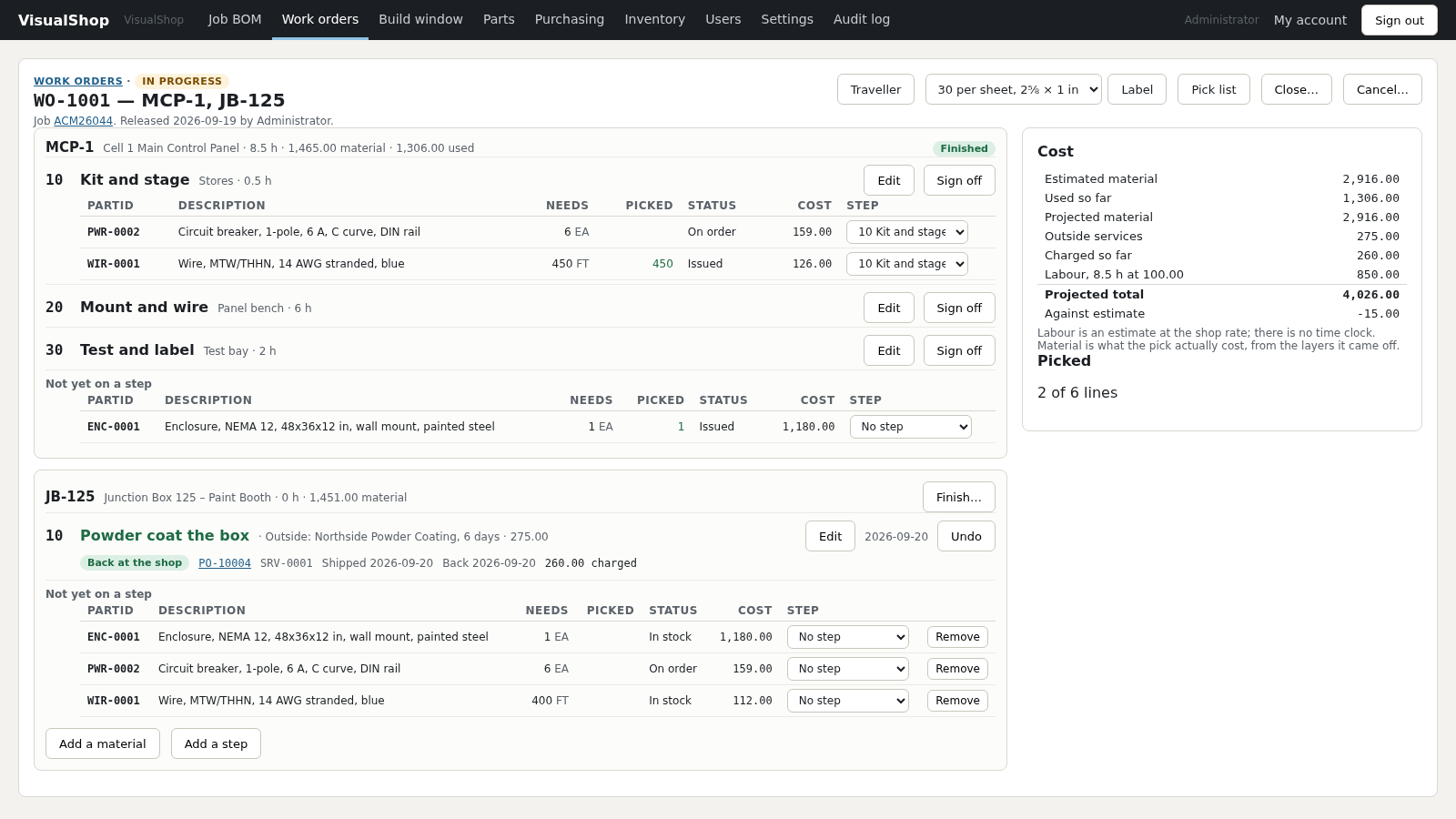
Work order WO-1001 in detail. The MCP-1 branch is finished, with operations 10, 20 and 30 and their material lines showing issued and on order. The JB-125 branch has an outside powder coat step marked back at the shop against PO-10004. A cost panel on the right lists estimated material, used so far, projected material, outside services, labour and a projected total of 4,026.00 against an estimate of 4,041.00.
Fig. 09 — Work order Branches, operations, the outside step and its PO line, and the running cost.
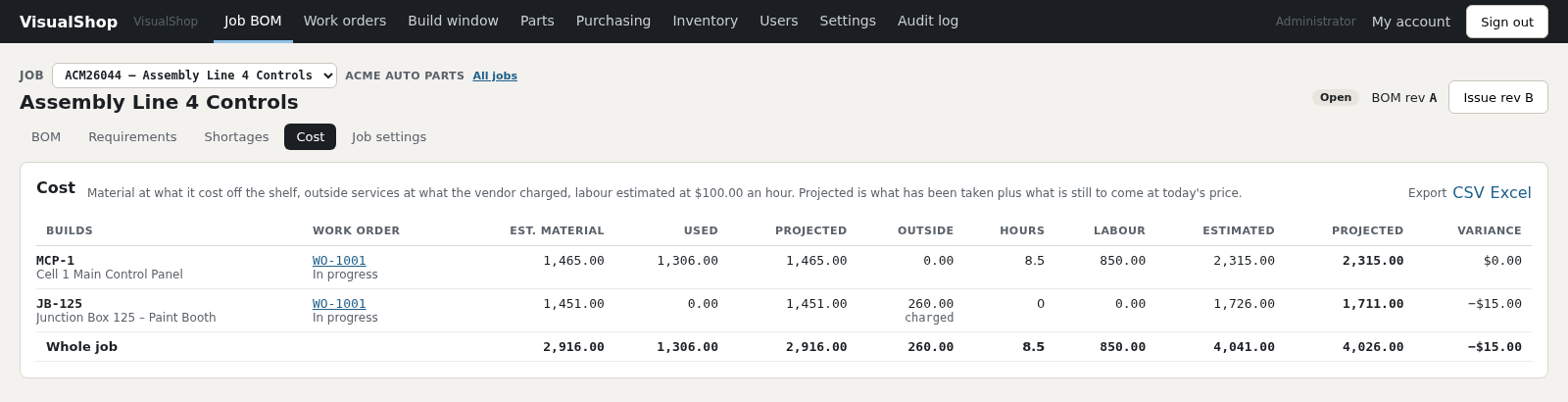
The job cost tab for ACM26044. Two builds, MCP-1 and JB-125, each with estimated material, used, projected, outside services, hours, labour, estimated total, projected total and variance. The whole job is projected at 4,026.00 against an estimate of 4,041.00, a variance of minus 15 dollars.
Fig. 10 — Job cost Projected: what has been taken, plus what is still to come at today's price.
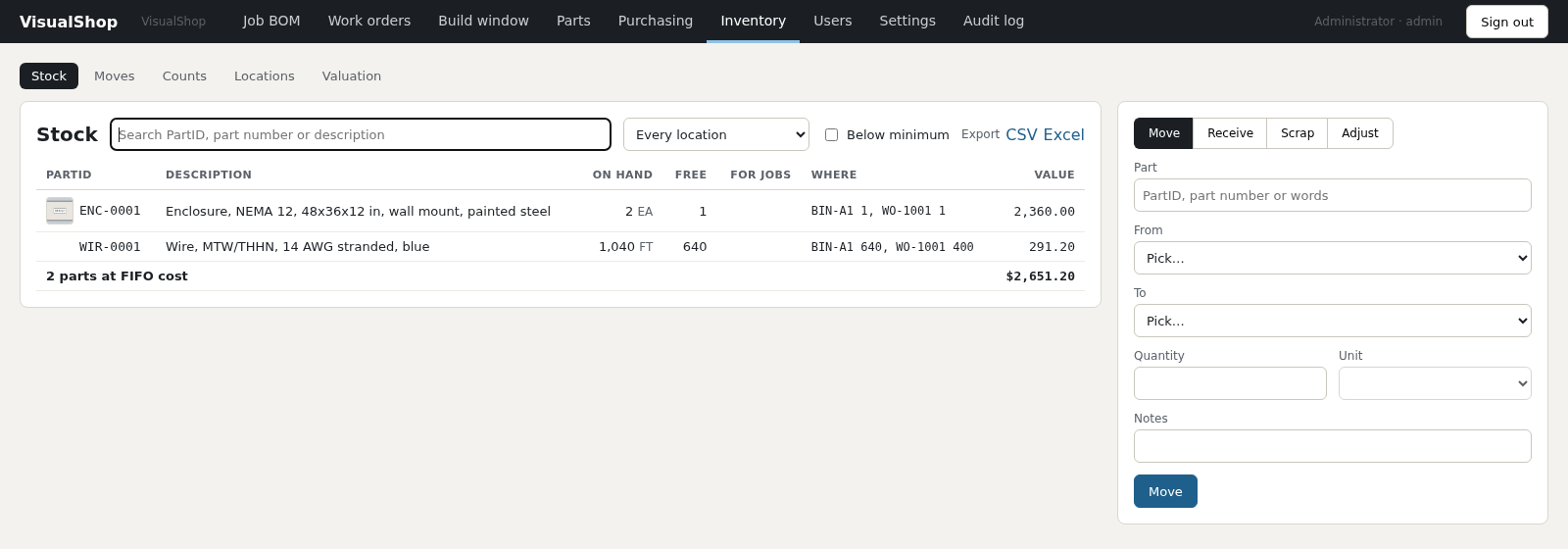
The stock screen showing two parts on hand, an enclosure and blue wire, each with quantity on hand, free quantity, quantity held for jobs, the bins they sit in and their FIFO value, totalling 2,651.20. A panel on the right moves, receives, scraps or adjusts stock.
Fig. 11 — Stock Where it is, how much is free, and what it is worth at cost.

Getting started

Hosted for you. Your company’s data kept to itself.

VisualShop runs at visualshop.studio, so there is nothing to install on a server or a workstation: a browser is enough. Each company’s records are kept apart by the database itself, backed up every night, and yours to take away whole at any time.

How the hosted service works
Reached byAny browser, in the office, the stores or on the shop floor. Nothing to install.
Your dataKept apart from every other company by the database, not just by the screens. Exported whole — every part, job, PO and picture — to a spreadsheet whenever you like.
RolesAdministrator, buyer, stores, shop floor and read-only. Every change is stamped with who made it.
BackupsNightly, including part pictures, with an encrypted copy kept off site. Restores are drilled, not assumed.
Starting upWe set up your company, you bring in your parts library from your existing .ods and invite your team. Jobs start fresh — go-live is a clean line.
PrintingPO, traveller, pick list and label PDFs. Bins, parts and work orders all carry a scannable code.
Where VisualShop sits Browsers in the office, the stores and on the shop floor reach VisualShop over HTTPS. Each company's records sit apart from every other's, with a nightly encrypted backup kept off site and labels and PDFs printed from the browser. Office BOMs, buying Stores Receiving, picking Shop floor Travellers, build window HTTPS visualshop.studio Your company’s records, kept apart Nightly backup Encrypted, off site Labels, PDFs Code 128 and QR Your shop · any browser · your data kept to your company

Fig. 12 — Hosted. Each company’s records are kept apart by the database itself, and leave whole whenever you ask.

Printed codes

Every bin, part and work order carries a code

Labels print thirty to a sheet at 2⅝ × 1 inch, or one at a time from the part. Code 128 for a laser scanner reading a traveller, QR for a phone reading a bin label across the shop. The patterns are checked against a scanner before they are trusted — the barcode on the label beside this paragraph is drawn by the same code that prints them.

Scope

What it does, and what it deliberately doesn't.

It does

  • Parts, vendors, manufacturers, categories, units
  • Jobs, BOMs by location, spares, requirements
  • Suggested buys, purchase orders, receiving
  • Stock locations, moves, counts, FIFO valuation
  • Work orders, routings, picking, issuing, outside operations
  • Job cost and shortage reports, exports on every list

It doesn't

  • Quotes and sales orders
  • Vendor invoices and accounts payable
  • A time clock — labour is an estimate at one shop rate
  • Payroll, general ledger, CRM
  • Anything that belongs to your accounting package

Who it's for

Shops of roughly five to fifty people building electrical panels, control systems, machinery or weldments to order — where every job is a little different, the parts library is the real asset, and somebody is currently keeping it all straight in a spreadsheet.

Talk to us

Bring us one of your jobs.

The fastest way to see whether this fits your shop is to watch one of your own BOMs go through it. Send us a job — the parts, the locations, what you bought — and we will walk it through end to end, from the library to what it cost.

  • Emailsales@embeddediron.com
  • Built byEmbedded Iron
  • DemoAbout forty minutes, on a call, with your data or ours.

Goes straight to sales@embeddediron.com. No list, no newsletter.